
Computer Rental Management Software to Manage Inventory, Billing & Delivery Challans for Indian Businesses
Manage customers, inventory, delivery challans, billing, invoices, payments, and reports from one easy-to-use rental CRM platform.
Inventory Tracking
Track every rental product in real time
Delivery Challans
Generate and manage delivery challans instantly.
Flexible Billing
Support Day-wise, Monthly, and Contract Period billing.
Reports & Analytics
Monitor inventory, billing, and business performance with detailed reports.
Manage Your Entire Computer Rental Business from One Powerful CRM
Webtrix24 Computer Rental CRM helps you manage inventory, customers, delivery challans, billing, invoices, payments, and reports from one centralized platform.
Whether you run a small rental business or manage thousands of rental assets, our software simplifies daily operations, improves accuracy, and helps your business grow.
Unlock Growth with the Best Free CRM
Revolutionize your customer management with our leading free CRM. Enjoy seamless integration, intuitive design, and powerful features at no cost.

100% Free*

TLS encryption

Auto Backups

Dedicated Support

Complete Control of Customers, Rentals & Assets
Pain Point: Businesses struggle to keep track of which customer has which assets, leading to confusion, missed returns, and poor customer service.
How It Benefits You
Managing rentals shouldn’t feel like a puzzle. Our CRM gives you a single dashboard where you can see every customer’s journey—how many assets they’re using, what’s been replaced, what’s pending for return, and what’s due for an upgrade.
Key Benefits
- Track every customer’s rented products
- View complete product journey and history
- Manage replacements and upgrades easily
- Reduce missed returns and billing mistakes
Smarter Product Journey Tracking
Pain Point: Businesses often struggle to track where rental products are, how long they stay with customers, and when they should be returned, upgraded, or replaced.
How It Benefits You
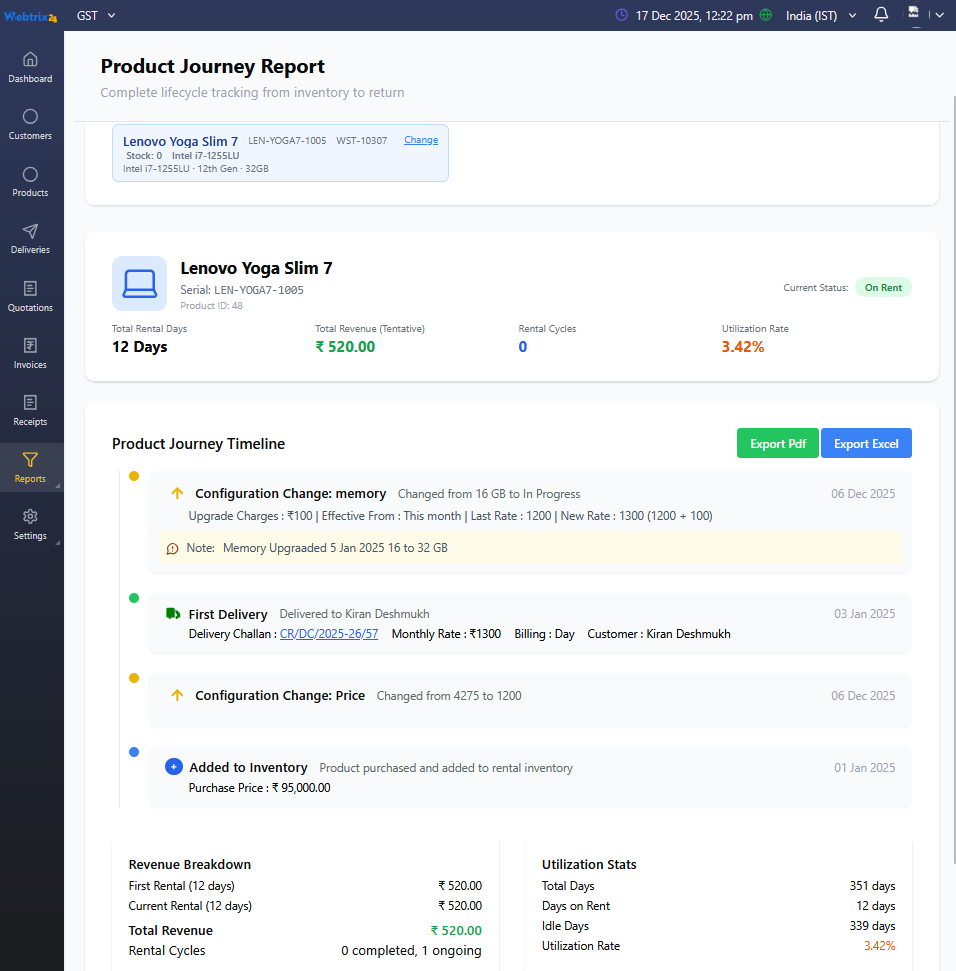
Track the complete lifecycle of every rental asset—from purchase and inventory to delivery, upgrades, replacements, returns, and revenue. Get complete visibility into product utilization and make better business decisions.
Key Benefits
- View complete product journey timeline
- Track rental duration and utilization
- Manage upgrades and replacements
- Improve asset utilization and ROI

Fast & Accurate Invoice Generation
Pain Point: Creating rental invoices manually can take time and may lead to billing errors or payment delays.
How It Benefits You
Generate accurate rental invoices in just a few clicks with automatic rental calculations for Day-wise, Monthly, and Contract Period billing. Download, print, or share invoices instantly.
Key Benefits
- Generate invoices in one click
- Supports Day-wise, Monthly & Contract Billing
- Accurate rental calculations
- Download and share invoices instantly
Professional Delivery Challan Management
Pain Point: Managing delivery challans manually can be time-consuming and may lead to missing product details, accessories, or delivery records.
How It Benefits You
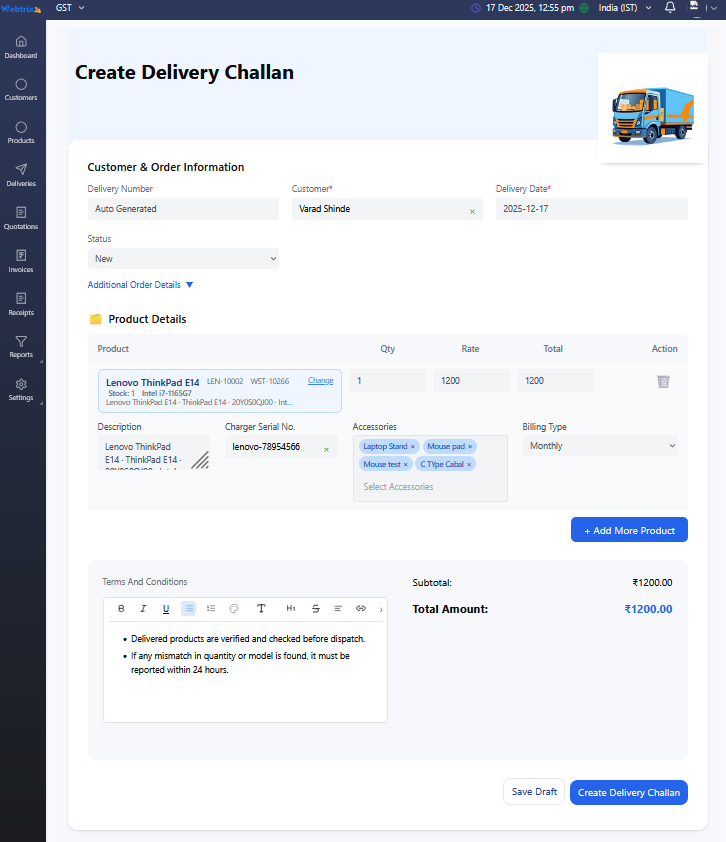
Create delivery challans in minutes with complete product details, accessories, serial numbers, billing type, and terms & conditions. Share challans instantly and maintain accurate delivery records.
Key Benefits
- Create delivery challans quickly
- Add multiple products & accessories
- Track serial numbers and billing type
- Share or print challans instantly
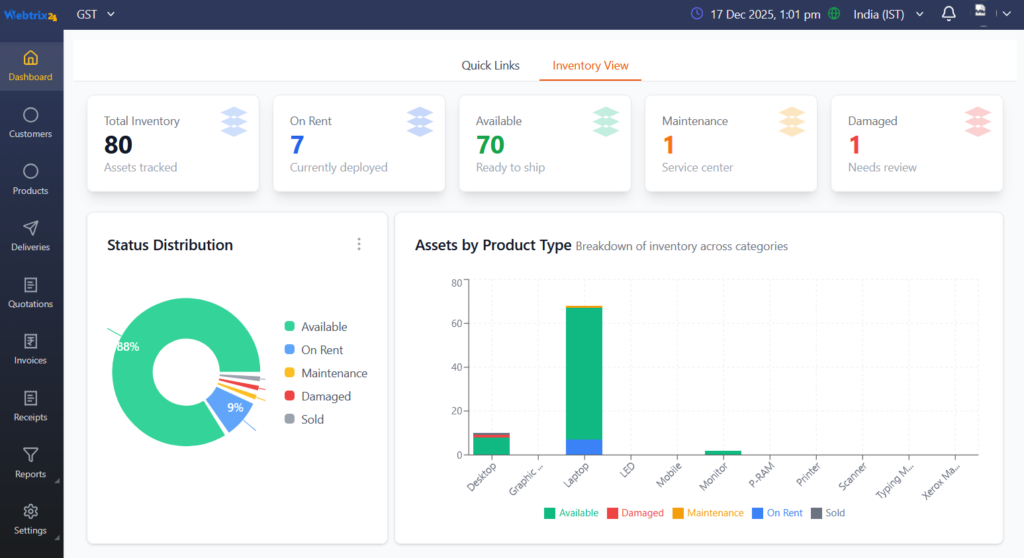
Real-Time Business Dashboard & Reports
Pain Point: Without a centralized dashboard, tracking inventory, billing, customer activity, and business performance becomes difficult.
How It Benefits You
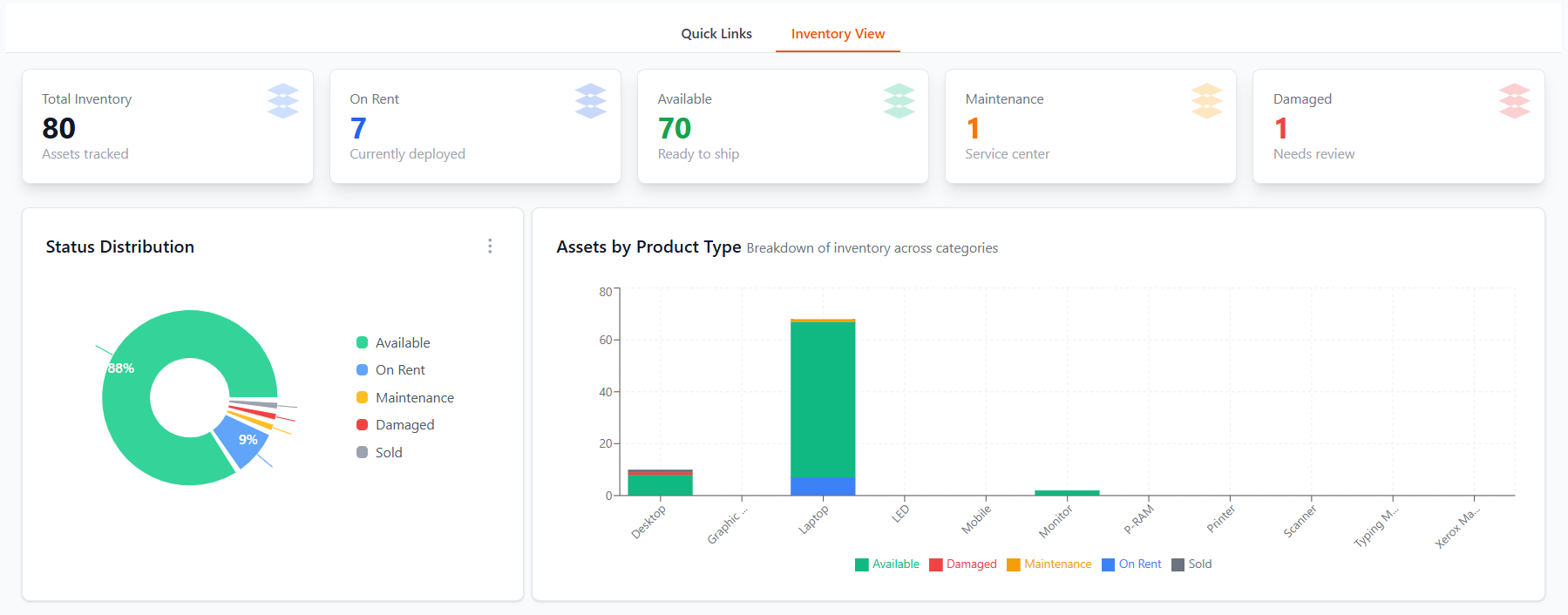
Monitor inventory, active rentals, pending billing, revenue, and customer activity from a single dashboard. Get real-time insights that help you make faster and smarter business decisions.
Key Benefits
- Live inventory overview
- Track active rentals & billing
- Monitor business performance
- Export reports for better analysis
Advanced Reports & Business Insights
Pain Point: Without detailed reports, tracking inventory, billing, customer history, and business performance becomes difficult.
How It Benefits You
Generate detailed reports on inventory, customer equipment, pending billing, rental history, and revenue. Export reports instantly to Excel or PDF for better analysis and business planning.
Key Benefits
- Customer Equipment Reports
- Pending Billing Reports
- Export to Excel & PDF
- Better Business Insights

Role-Based User Access & Permission Management
Pain Point: Without proper user access control, employees may access sensitive business data, increasing the risk of mistakes and security issues.
How It Benefits You
Create user roles and assign module-wise permissions for customers, products, invoices, reports, deliveries, and settings. Ensure every team member has access only to the features they need.
Key Benefits
- Role-based user access
- Module-wise permissions
- Protect sensitive business data
- Better team security & control
Ready to Simplify Your Computer Rental Business?
Start managing inventory, customers, delivery challans, billing, invoices, and reports from one powerful CRM. Get free training and implementation support to help your team get started quickly.
FAQs
Webtrix24 Computer Rental CRM is a complete software solution designed to manage rental business operations in one place. It helps you handle inventory, deliveries, billing, invoices, returns, upgrades, and reports efficiently, reducing manual work and errors.
This system is ideal for computer rental businesses, IT equipment providers, and companies managing rented assets like laptops, desktops, printers, and other devices.
Yes, the system allows you to manage unlimited customers and assets. Each product is tracked individually with full details such as serial number, delivery history, billing type, and status.
A Delivery Challan is used to assign products to a customer and start the rental process. It records delivery details, customer information, product list, and billing type such as day-wise, monthly, or contract.
Yes, a delivery challan can be cancelled only if no further actions like invoice generation, return, replacement, or upgrade have been performed on that product.
Yes, you can add multiple products in a single delivery challan, allowing you to assign multiple assets to a customer in one transaction.
Yes, the system supports product replacement and upgrades. All changes are tracked properly, and billing is adjusted automatically based on the updated configuration.
Day-wise billing is calculated based on the actual number of days the asset is used, but it is derived from a fixed monthly (flat) rental amount.
The system first takes the monthly rent as a base value and divides it by the total number of days in that month (28/30/31) to calculate the per-day rate.
Example:
Monthly Rent = ₹3000
Month = 30 days
Per Day Rate = 3000 ÷ 30 = ₹100
If used for 10 days → ₹100 × 10 = ₹1000
This means billing is proportional to usage but always calculated from a fixed monthly base.
Monthly billing follows a flat billing structure, where the full monthly rent is charged regardless of the number of days the asset is used within that month.
Example:
Monthly Rent = ₹3000
Used for 5 days or 25 days → ₹3000 (full month charged)
Contract billing is based on a fixed duration agreed with the customer. The system calculates the total amount for the entire contract period.
Example:
Contract = 3 months
Total Amount = ₹9000
This amount is fixed and not dependent on daily usage.
Yes, if a product is returned before the billing date, the system calculates billing based on actual usage days (in day-wise billing).
If a product is upgraded, the system applies the new rate from the upgrade date.
Billing is automatically split:
- Before upgrade → old rate
- After upgrade → new rate
Invoices are generated manually after selecting customer assets. This ensures proper verification and accurate billing before finalizing the invoice.
No, invoices are not auto-generated. This approach ensures better control, prevents incorrect billing, and allows users to review details before generating invoices.
Yes, the system allows both full and partial payments. You can record multiple payments until the invoice amount is fully cleared.
Once an invoice is generated, the selected assets are removed from pending billing and cannot be billed again for the same period, ensuring no duplicate billing.
Yes, the system fully supports GST calculation during invoice generation.
GST is applied based on the location of the company and customer:
- Same State → CGST + SGST
- Different State → IGST
Yes, GST can be included as per your billing requirements during invoice generation.
Yes, each product can be tracked with statuses like Available, Delivered, Returned, Replaced, and Upgraded.
In addition to status, the system also shows “Issued to Customer”, which helps you identify exactly which customer currently has the product.
When a product is delivered on rent:
- Its status changes to On Rent / Delivered
- The customer name is automatically linked to that product
This allows you to:
- Easily see which asset is with which customer
- Track product allocation in real-time
- Avoid confusion in case of multiple similar products
Example:
If you have multiple laptops of the same model, you can clearly see which serial number is issued to which customer.
Yes, each product can be assigned a unique serial number, which helps in accurate tracking and management of individual assets.
Serial numbers ensure each product is uniquely identified and linked to a specific customer during delivery.
It helps track complete product history, including delivery, return, replacement, and maintenance.
Example:
If you have multiple laptops of the same model, each will have a unique serial number, allowing you to track exactly which device is assigned to which customer.
This improves inventory control, reduces confusion, and ensures better accountability.
Pending Billing Report shows all assets that are not yet invoiced, including ongoing rentals and returned products whose billing is still pending.
Yes, you can filter data based on customer, status (ongoing or returned), and billing type.
Yes, you can directly generate invoices from the pending billing report, making the billing process faster and easier.
Yes, you can add multiple users and assign roles such as admin or employee.
Yes, the system provides role-based access control, allowing you to manage permissions for each user.
Invoices are kept manual to ensure accurate billing, proper verification, and to avoid incorrect charges.
No, once a record is approved, it cannot be edited. This ensures data integrity and proper tracking.
Only available inventory is shown to ensure that already assigned or unavailable products are not selected again, preventing errors in delivery.