
The Integrations module allows businesses to connect Webtrix24 CRM with external platforms, communication services, and third-party applications. Integrations help automate workflows, synchronize data, and improve business operations.
Access Integrations
Steps:
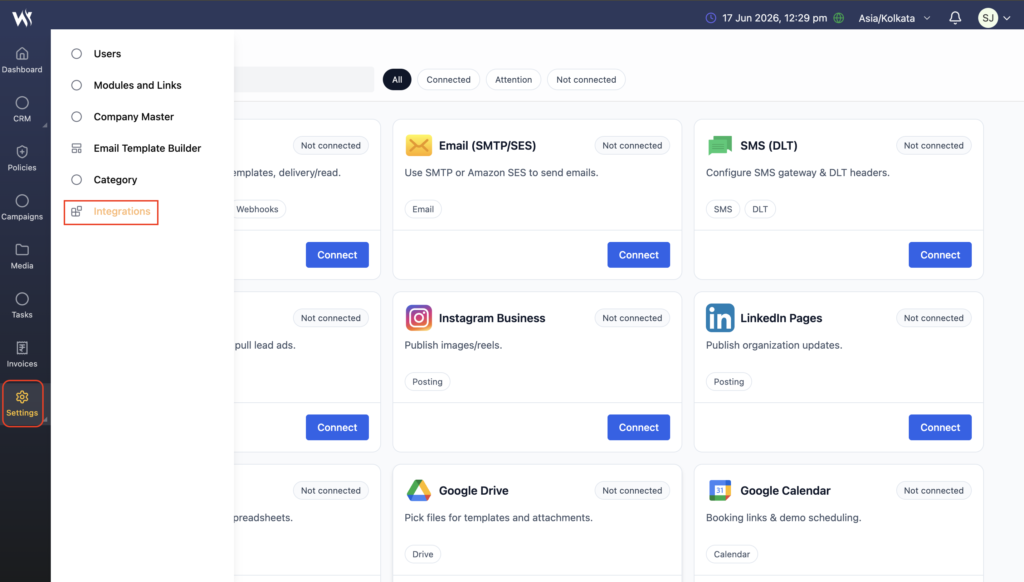
- Navigate to Settings → Integrations.
- The Integrations page will open.
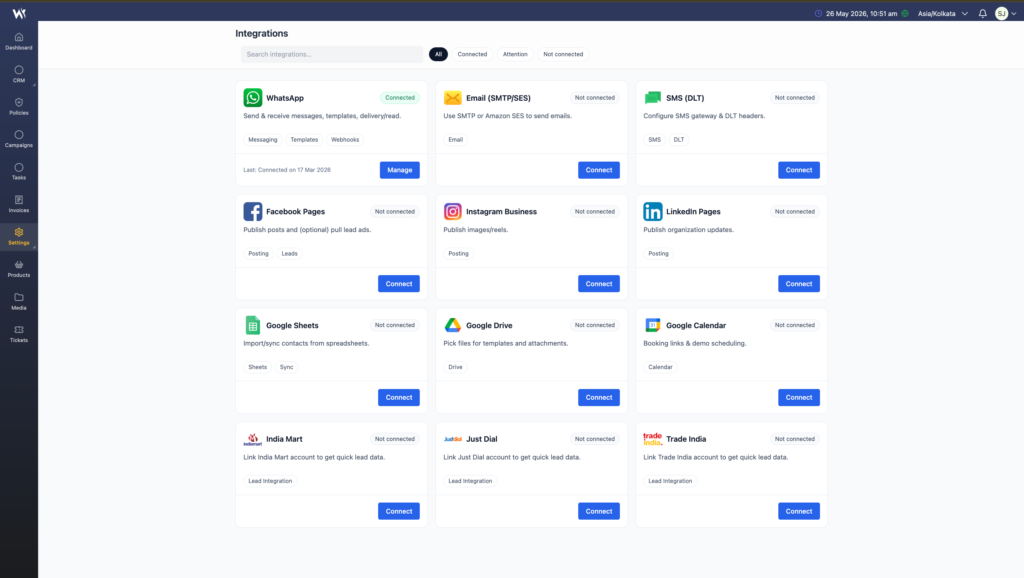
- View available integrations and configuration options.
Supported Integrations
Webtrix24 CRM can support various types of integrations, including:
- Email Services
- SMS Gateway
- WhatsApp Integration
- Payment Gateway
- Third-Party APIs
- Calendar Integration
- Notification Services
Available integrations may vary depending on your CRM configuration.
Configure an Integration
Administrators can configure integrations by providing the required settings and authentication details.
Depending on the integration, configuration may include:
- API Keys
- Authentication Credentials
- Webhook URLs
- Service Configuration Settings
After configuration, save the settings to activate the integration.
API Connectivity
Webtrix24 CRM supports API-based connectivity for integrating external applications and services.
API integrations help businesses:
- Exchange data between systems
- Automate workflows
- Synchronize customer information
- Reduce manual data entry
Integration Management
Administrators can manage integrations by:
- Enabling integrations
- Disabling integrations
- Configuring API settings
- Managing authentication credentials
- Monitoring integration status
Frequently Asked Questions
Why are integrations important?
Integrations help connect Webtrix24 CRM with external systems, reducing manual work and improving workflow efficiency.
What types of services can be integrated?
Businesses can integrate email services, SMS gateways, WhatsApp, payment gateways, calendars, APIs, and other supported services.
Who can manage integrations?
Users with the required administrative permissions can configure and manage integrations.
Can integrations automate business processes?
Yes. Integrations can automate notifications, data synchronization, communication, and other business workflows.
Integration Management Tips
- Verify integration settings before enabling them.
- Regularly review API credentials and authentication details.
- Disable unused integrations to improve security.
- Monitor integration status to ensure successful data synchronization.
- Use integrations to reduce manual data entry and automate workflows.