
The Receipts Module in Webtrix24 Rental CRM provides a centralized place to view and track payment receipts generated from customer invoice payments.
When a full or partial payment is recorded against an invoice, the corresponding receipt information is available in the Receipts module.
How to Open the Receipts Module
To open the Receipts module:
- Log in to Webtrix24 Rental CRM.
- Go to the left-side navigation menu.
- Click Receipts.
- The Receipts List View opens.
The List View displays the payment receipt records available in the system.
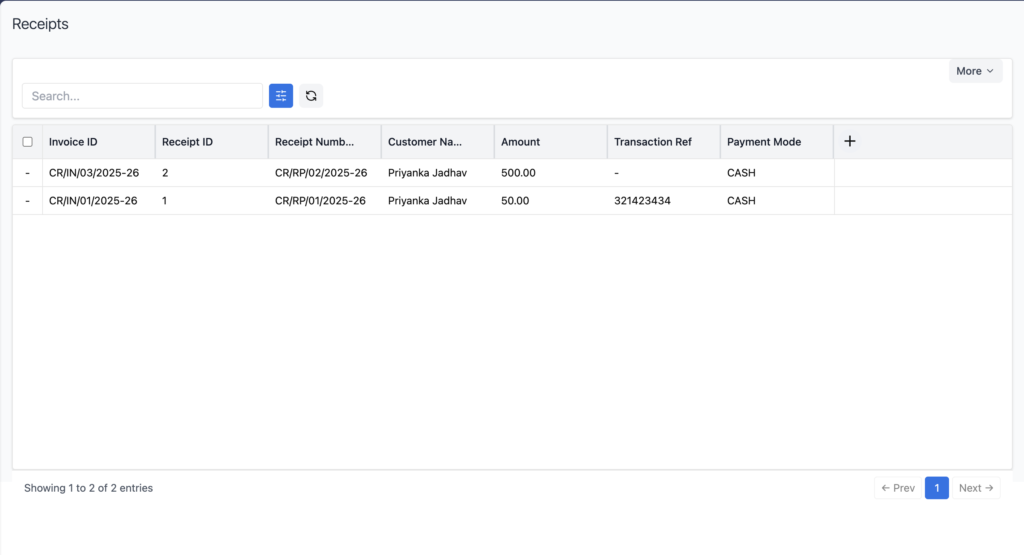
Receipts List View
The Receipts List View displays payment records generated from invoice payments.
The list includes important receipt and payment information such as:
- Invoice ID
- Receipt ID
- Receipt Number
- Customer Name
- Amount
- Transaction Reference
- Payment Mode
This allows users to quickly identify which customer payment is associated with which invoice.
How Receipt Entries Are Created
Receipt entries are generated when a payment is recorded against an invoice.
The process is:
- Open the Invoices module.
- Select an invoice.
- Use the Log Full / Partial Payment action.
- Enter the payment details.
- Save the payment.
- The payment receipt entry is created.
- Open the Receipts module to view the payment record.
This keeps invoice payments and receipt records connected.
Full and Partial Payment Receipts
The Receipts module supports payment records created from both:
Full Payment
When the complete pending invoice amount is paid, the payment is recorded against the invoice and the corresponding receipt entry appears in the Receipts module.
Partial Payment
When only part of the pending invoice amount is paid, the payment is recorded as a partial payment and the corresponding receipt entry is also available in the Receipts module.
Receipt Information
Each receipt record can show details such as:
Invoice ID
Identifies the invoice against which the payment was recorded.
Receipt ID
A unique identifier for the receipt record.
Receipt Number
The receipt number generated for the payment entry.
Customer Name
Displays the customer who made the payment.
Amount
Displays the amount recorded against the invoice.
Transaction Reference
Displays the transaction reference entered while recording the payment, when available.
Payment Mode
Displays the payment method selected for the payment.
Payment Modes
When recording an invoice payment, the applicable payment mode can be selected.
Examples include:
- Cash
- UPI
- Card
- Bank
- Other
The selected payment mode is displayed in the corresponding receipt record.
Transaction Reference
A Transaction Reference can be recorded for payments where a reference number is available.
For example, users can record a transaction or reference number for online or bank payments.
This reference is then available in the Receipts List View for payment tracking.
Search Receipts
The Receipts module provides a Search option in the List View.
Users can use the search field to quickly locate relevant receipt records based on available receipt or payment information.
This makes it easier to find a specific customer payment or receipt entry without manually checking all records.
Invoice and Receipts Module Integration
The Invoices and Receipts modules work together for payment tracking.
The typical flow is:
Invoice Created → Payment Recorded → Receipt Entry Created → Receipt Visible in Receipts Module
This provides a clear connection between the invoice, customer payment, and receipt record.
Benefits of the Receipts Module
The Receipts Module helps rental businesses:
- Track customer payments from a centralized location.
- Maintain receipt records for invoice payments.
- Identify invoice-related payments using Invoice ID.
- Track payment amounts received from customers.
- View payment modes used for transactions.
- Record transaction references for payment tracking.
- Manage full and partial payment records more efficiently.
- Connect invoice payments with receipt entries for better financial tracking.
Frequently Asked Questions
What is the Receipts Module in Webtrix24?
The Receipts Module is used to view and track receipt entries generated from payments recorded against customer invoices.
How is a receipt created in Webtrix24?
A receipt entry is generated when a full or partial payment is recorded against an invoice from the Invoices module.
Can I track partial payments in the Receipts Module?
Yes. Payments recorded as partial payments against invoices are available as receipt entries in the Receipts module.
What information is displayed in the Receipts List View?
The List View displays information such as Invoice ID, Receipt ID, Receipt Number, Customer Name, Amount, Transaction Reference, and Payment Mode.
Can I see the invoice associated with a receipt?
Yes. The Invoice ID displayed in the receipt record identifies the invoice associated with the payment.
Can transaction references be recorded for payments?
Yes. A transaction reference can be entered while recording the payment and is displayed in the receipt record when available.
Does the Receipts Module support different payment modes?
Yes. Payment records can contain the selected payment mode, such as Cash, UPI, Card, Bank, or Other.
Where can I find customer payment receipts?
Open Webtrix24 → Receipts from the left-side navigation menu to view the available receipt records.