
The Users module allows administrators to create and manage user accounts in Webtrix24 CRM. Users can be assigned roles, company access, and login credentials to access the system.
Access User
Steps:
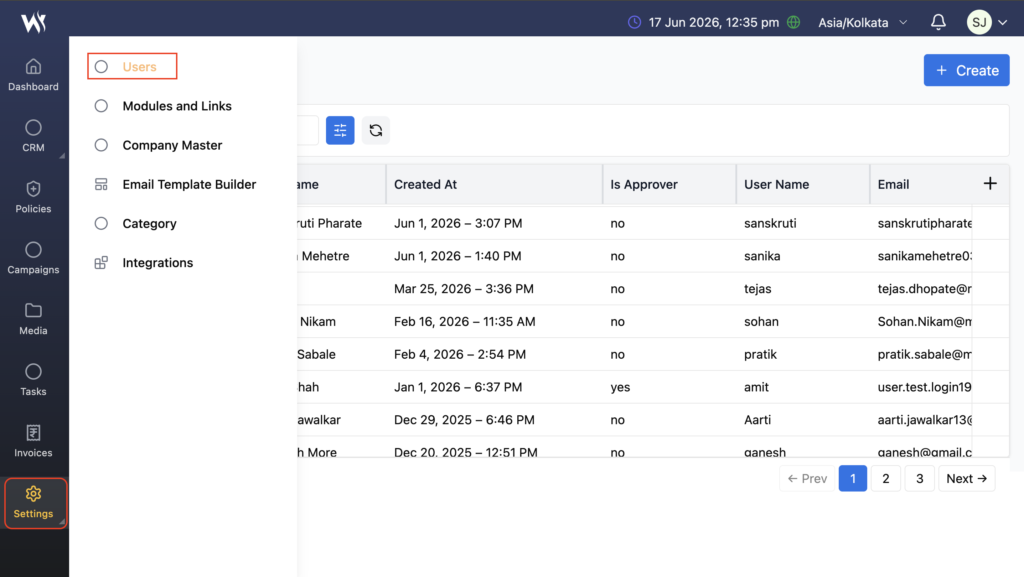
- Navigate to Settings → Users.
- The User Management page will open.
- View existing users or create a new user.
What is the Users Module?
The Users module helps organizations manage employee access and responsibilities within the CRM system.This module is available across:
- Core CRM
- Rental CRM
- Insurance CRM
- Other Webtrix24 business solutions
Creating a New User
Administrators can create new user accounts to provide access to the CRM system.
User Information
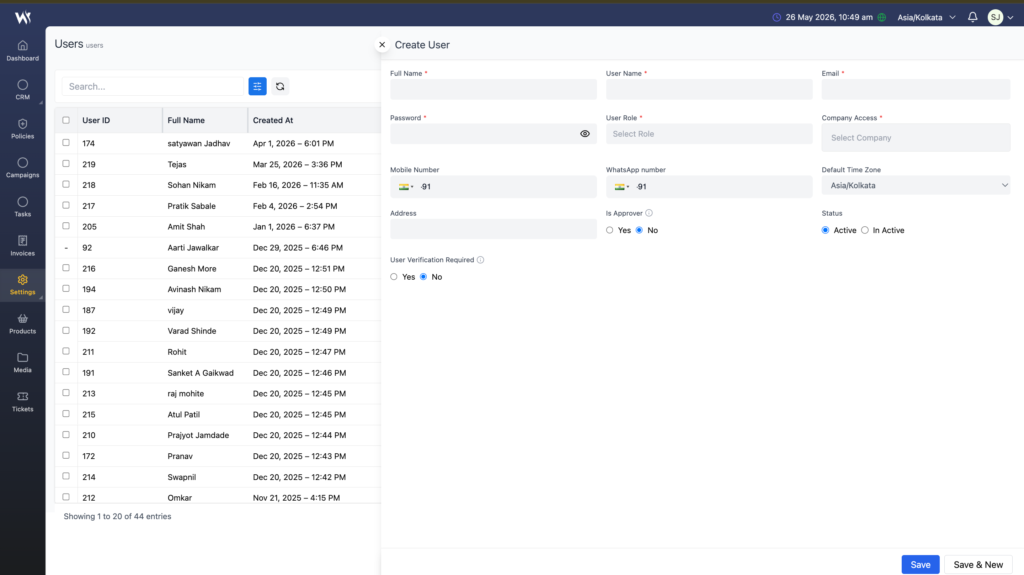
When creating a user, administrators can configure:
- Full Name
- Email Address
- Mobile Number
- Department
- Role
- Login Credentials
After saving, the user can access the CRM based on the assigned permissions.
Assigning Users to Records
Users can be assigned to different records and business activities.
Examples include:
- Leads
- Customers
- Tasks
- Projects
- Opportunities
- Support Activities
The assigned user becomes responsible for managing the selected record or activity.
User Roles
Each user must be assigned a role during user creation.
The assigned role determines the user’s responsibilities and access within the CRM system.
Company Access
Administrators can assign users to one or more companies using the Company Access option.
Users can access only the companies assigned to them.
User Status Management
Administrators can control user availability through different user statuses.
Active Users
Active users can log in and access the CRM system.
Inactive Users
Inactive users remain in the system but may have restricted access based on configuration.
Blocked Users
Blocked users are restricted from accessing the CRM system.
Frequently Asked Questions
Why is a User Role required?
User Roles help define responsibilities and control access within the CRM.
Can a user access multiple companies?
Yes. Multiple companies can be assigned through the Company Access option.
What is the purpose of the Is Approver option?
The Is Approver setting allows selected users to participate in approval workflows where applicable.
What happens when a user is marked as Inactive?
Inactive users may not be able to access the CRM depending on system configuration.