
The Chargers Module in Webtrix24 Rental CRM helps rental businesses manage and track charger serial numbers separately. Users can add charger serial numbers, view existing charger records, and use the available chargers while creating Delivery Challans.
How to Open the Chargers Module
To open the Chargers Module:
- Log in to Webtrix24 Rental CRM.
- Go to Settings from the left-side menu.
- Click Chargers.
- The Chargers module opens.
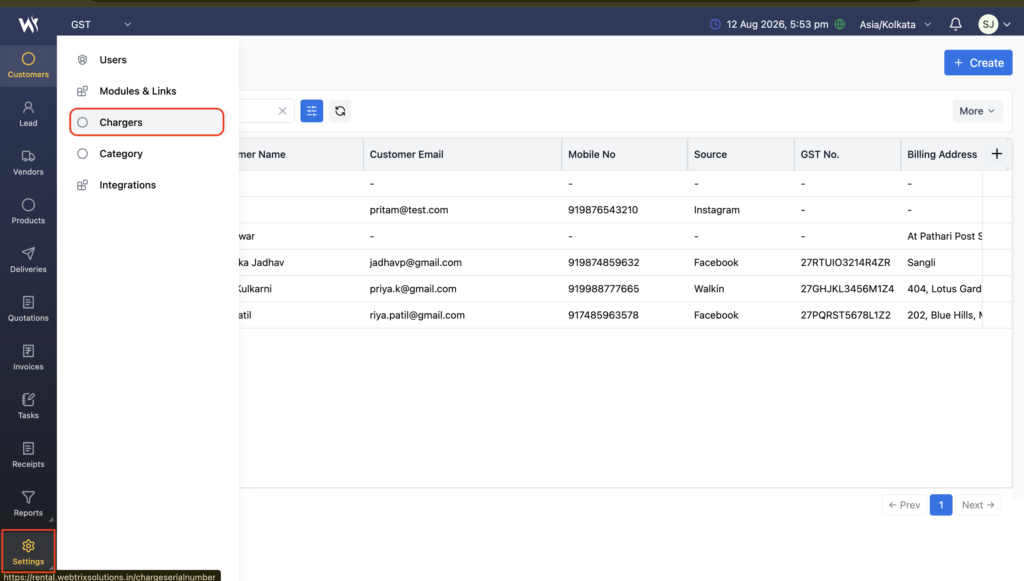
Chargers Module Overview
The Chargers module is designed to maintain a separate list of charger serial numbers.
Users can:
- Add new charger serial numbers.
- View all added chargers.
- Search for charger records.
- Track charger creation and modification details.
- Use registered chargers while creating Delivery Challans.
This helps rental businesses maintain better control over chargers issued with rental equipment.
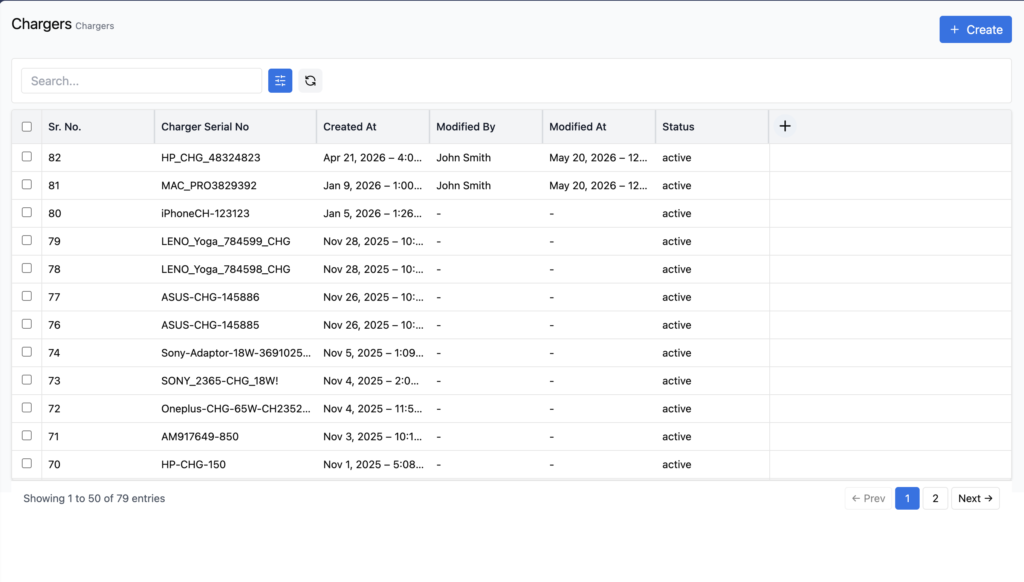
Charger List View
After opening the Chargers module, the Charger List View displays all available charger records.
The list includes details such as:
- Charger Serial Number
- Created By
- Created At
- Modified By
- Modified At
For example, charger serial numbers such as Del-435 and ACE_CHG_123 can be maintained in the list.
Add a Charger
To add a new charger:
- Open Settings → Chargers.
- Click + Create.
- The Add Chargers form opens.
- Enter the Charger Serial No.
- Click Save.
The new charger serial number is then added to the Chargers List View.
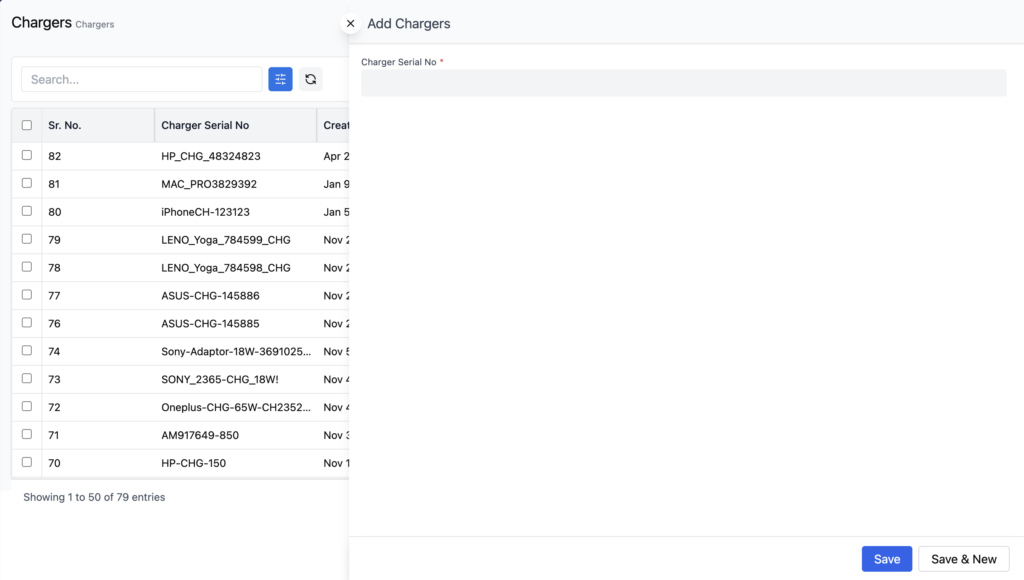
Save & New
The Save & New option is also available while adding a charger.
It allows users to:
- Enter a charger serial number.
- Save the charger record.
- Continue adding another charger without manually reopening the create form.
This is useful when multiple chargers need to be added to the system.
Search Chargers
The Search option is available in the Chargers List View.
Users can use the search field to quickly find a charger record using its charger serial number.
This makes it easier to locate a specific charger when managing multiple rental accessories.
Charger Tracking
The Chargers module maintains basic record information for each charger, including:
- Charger Serial Number
- Created By
- Created At
- Modified By
- Modified At
This provides visibility into when charger records were created or modified and by whom.
Chargers in Delivery Challans
Added charger serial numbers can be used in the Deliveries module while creating Delivery Challans.
This allows users to associate the appropriate charger with the rental equipment being delivered to a customer.
By maintaining charger serial numbers separately, rental businesses can improve accessory tracking during the delivery process.
Charger Tracking During Rental and Return
The Chargers module helps maintain a clear record of charger serial numbers associated with rental equipment.
This supports better tracking during:
- Product Delivery
- Rental Period
- Product Return
It helps users identify the correct charger associated with rental equipment and reduces the possibility of charger mismatch.
Benefits of the Chargers Module
The Chargers module helps rental businesses:
- Maintain charger serial numbers separately.
- Track individual chargers used with rental equipment.
- Assign the correct charger during delivery.
- Improve accessory tracking.
- Reduce charger mismatch issues.
- Search charger records quickly.
- Maintain charger creation and modification details.
- Support better charger tracking during product return.
Frequently Asked Questions
What is the Chargers Module in Webtrix24?
The Chargers Module is used to manage and track charger serial numbers separately from rental products.
Where can I find the Chargers Module?
Go to Settings → Chargers from the left-side navigation menu.
How do I add a charger?
Open Settings → Chargers, click + Create, enter the Charger Serial No., and click Save.
Can I add multiple chargers?
Yes. The Save & New option allows users to save one charger and continue adding another charger.
What information is stored for a charger?
The module stores the Charger Serial Number, Created By, Created At, Modified By, and Modified At information.
Can I search for a charger?
Yes. The Chargers List View provides a Search option to quickly find charger records.
Where are the added chargers used?
The added charger serial numbers are available in the Deliveries module while creating Delivery Challans.
Why should charger serial numbers be maintained separately?
Maintaining charger serial numbers separately helps rental businesses track accessories and associate the correct charger with the correct rental equipment.
Does the Chargers Module help with product returns?
Yes. Maintaining charger serial numbers supports accessory tracking during the rental and product return process and helps reduce charger mismatch issues.